New sign-up: create your Lite account
The plan currently offered on the public sign-up page is Amzsol Lite. Create your login, verify your email, complete payment and connect Amazon Advertising. Use the detailed Lite sign-up guide below for the complete walkthrough.
How to use this page
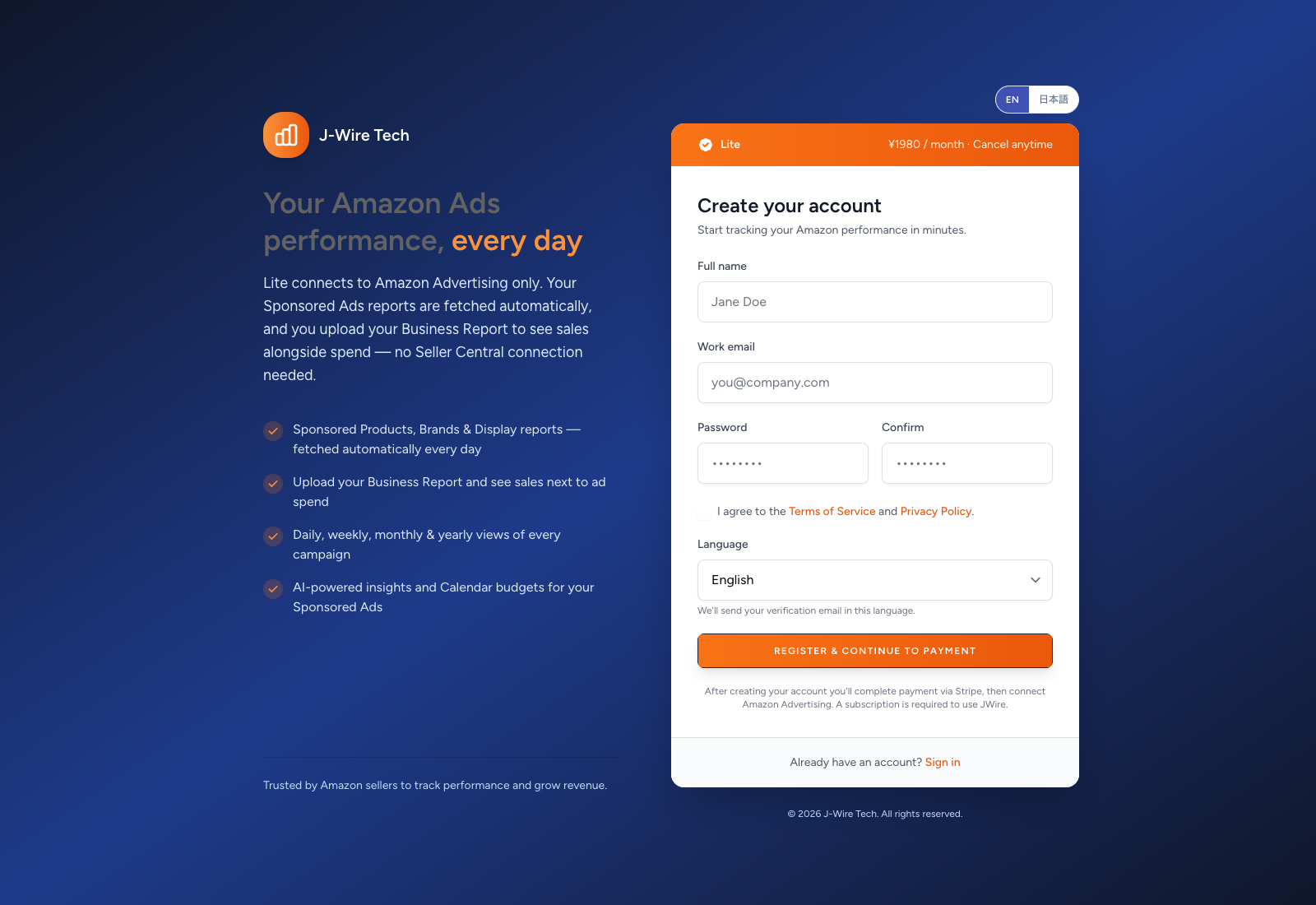
Open the sign-up form and confirm that the displayed plan is Lite. Review its current price, currency and billing interval. The page shows the plan offered by Amzsol; there is no separate edition selector.
Use EN / 日本語 to choose the page language. Enter your name and an email address you can open. Set and confirm a password of at least eight characters with uppercase and lowercase letters and a number, review the Terms of Service and Privacy Policy, and select the agreement checkbox.
Choose the verification-email language, then select Register & continue to payment. Open the verification email and confirm your address. If needed, check spam or request a new verification link.
Review the Lite plan and any optional add-ons shown. Leave extras unselected if you only want the core Lite service, and check the total before choosing Continue to payment and completing Stripe checkout. Follow the return to Amzsol and continue on Connect Amazon; if a confirmation page offers a connect button, use it.
Select Connect Amazon Advertising and authorise the Amazon login for the intended store. If several available profiles are listed, select your store by name, country, currency and profile identifier. Confirm the connected store before continuing.
Choose Go to reports and complete the terms-acceptance screen if prompted. Sponsored Ads reports are fetched automatically. Upload your Business Report on Files to add total sales and traffic figures.
Common questions
This email already has an account
Use Sign in with that email instead of creating another account. If you cannot remember the password, use the password-reset page or contact your administrator. Do not use another person's login.
Verification is missing or the link has expired
Check the email address and spam folder, then request a fresh link from Resend verification email. Open the newest message. Correct a mistyped address using Wrong email? Update it, then resend.
Payment completed, but setup is unfinished
Sign in with the same account and continue the next setup screen. Confirm your subscription status before attempting another payment. If the app still asks for payment after a completed checkout, contact support with the account email and checkout time.
Amazon connection failed or reports are empty
Check that the Amazon login can access the intended advertising profile. If prompted, select the correct store and confirm its country and currency. Sponsored Ads data can arrive after the connection completes; total sales also need a Business Report uploaded on Files. Send support the screen name and error if setup cannot continue.